
Angular

The extension has additional features for Angular projects.
Updating Angular
Section titled “Updating Angular”For Angular projects, click Packages > @Angular to update to the latest minor version, or migrate to the next major version of Angular. The ng migrate feature will be used to migrate your project.
New Angular Items
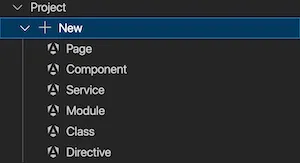
Section titled “New Angular Items”Select Project > + New to create Angular Components, Services, Modules, Classes, Directives and Ionic Pages.
Migrations
Section titled “Migrations”For Angular migrations click ... next to Project and choose from:
- Migrate to Signal Inputs - This refactors all
@Input()decorators to signal inputs. - Migrate to Built-In Control Flow Syntax - This refactors directives like
*ngForto@for. - Migrate to replace @Output with Output functions - Refactors out
@Outputdirectives. - Migrate to use inject for dependency injection - Refactors constructors declaring dependencies to use
inject. - Migrate ViewChild and ContentChild to use signals - Refactors these directives.
- Migrate to Ionic Standalone Components - Refactors to use standalone components for Ionic rather than Modules.
- Switch from Webpack to ESBuild - Your Angular project will be switched to use the ESBuild option.
Use HTTPS
Section titled “Use HTTPS”Angular projects can be run on a development web server that uses HTTPS by clicking Settings > Use HTTPS. More information can be found here.